Der Warenkorb ist leer

Fertigung

ITVDesk

ITVDesk für Fertigung und Produktion

ITVDesk ermöglicht die Überwachung von Produktionssystemen, Maschinenoberflächen, Leitständen und digitalen Prozessanzeigen direkt im bestehenden Videoüberwachungssystem.

Typische Anwendung

ITVDesk wird eingesetzt, wenn digitale Aktivitäten gemeinsam mit klassischem Videomaterial überwacht, aufgezeichnet oder später analysiert werden müssen.

Nutzen

  • Integration digitaler Quellen in bestehende VMS/NVR-Systeme
  • ONVIF- und RTSP-kompatible Bereitstellung
  • Keine zusätzliche Kamera-Hardware erforderlich
  • Bessere Nachvollziehbarkeit von Bildschirm- und Prozessaktivitäten

Sicherheit und Betrieb

ITVDesk unterstützt sichere Kommunikationsoptionen wie HTTPS, RTSPS und SRTP sowie lokale Verschlüsselung von Benutzerdaten.

ITVDesk for Manufacturing | Monitor SCADA, HMI & Production Systems in VMS

ITVDesk for Manufacturing & Production Monitoring

Manufacturing environments depend on precise coordination between machines, operators, and digital control systems. While surveillance cameras monitor production areas, critical processes and decisions take place within industrial software, control panels, and operator workstations.

ITVDesk extends visibility into these digital systems by integrating workstation screens and production interfaces directly into existing video surveillance platforms.

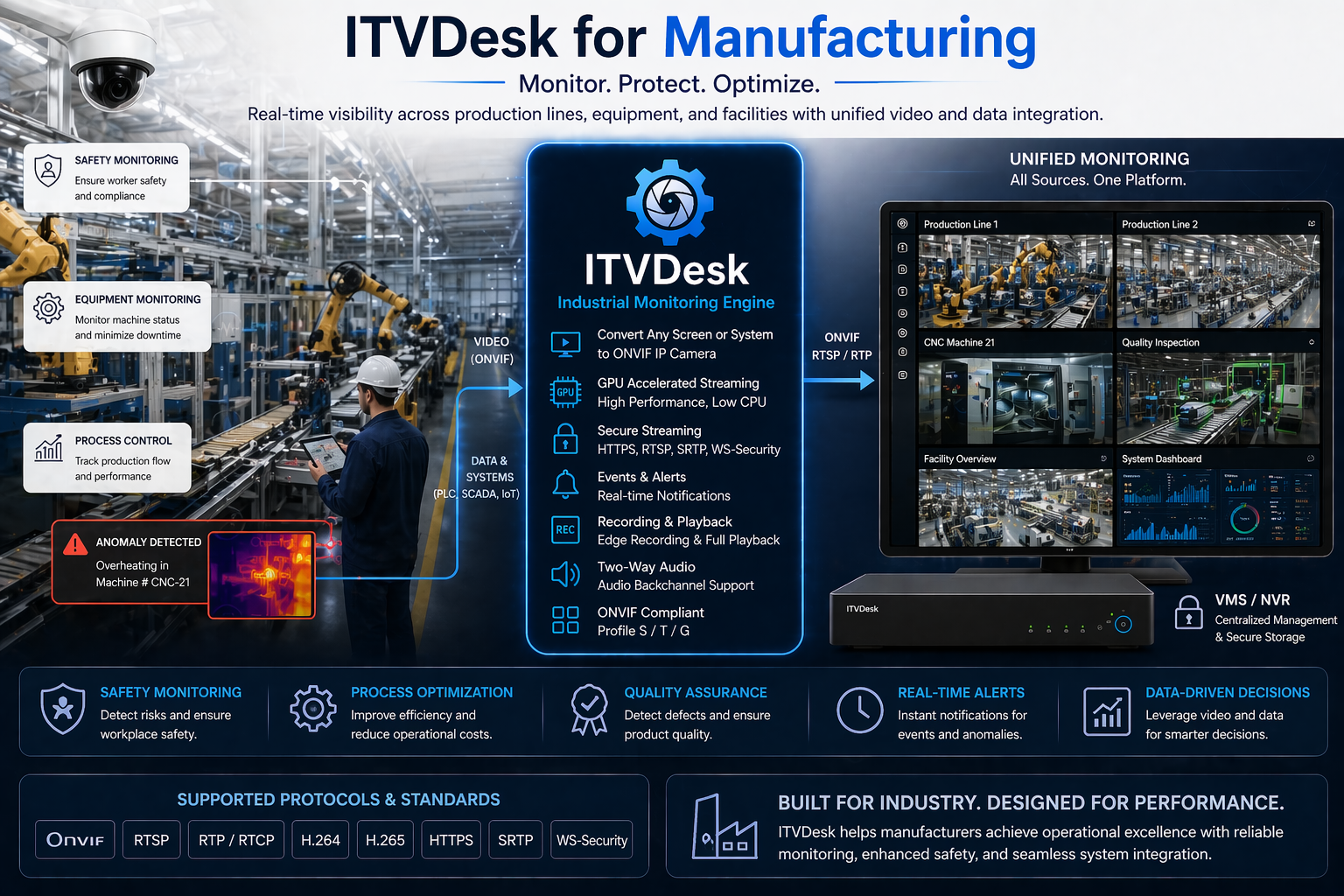
ITVDesk Manufacturing Monitoring - Production, Safety and Quality Control Integration

Real-time monitoring of production processes, safety, and quality control within a unified VMS environment

Operational Reality

Modern production lines are controlled through SCADA systems, HMI interfaces, and manufacturing execution systems (MES). Operators continuously monitor machine status, adjust parameters, and respond to real-time events through digital interfaces.

Traditional CCTV systems provide visibility into physical production areas, but do not capture what happens on operator screens or within production control systems.

This disconnect makes it difficult to fully understand incidents, production errors, or inefficiencies.

Key Challenges

  • No visibility into SCADA, HMI, and MES system activity
  • Difficulty correlating production events with operator actions
  • Limited insight into process errors and downtime causes
  • Complex monitoring across multiple production lines and facilities
  • Dependence on manual reporting and fragmented data sources

ITVDesk Approach

ITVDesk converts industrial workstations and production system interfaces into ONVIF-compatible video streams, allowing seamless integration into existing VMS and NVR systems.

  • Stream SCADA, HMI, and MES interfaces into surveillance systems
  • Record operator actions together with production line activity
  • Integrate digital monitoring into existing CCTV infrastructure
  • Enable centralized supervision across multiple production sites
  • Improve visibility without changing existing production systems

This creates a unified monitoring environment where both physical processes and digital controls can be analyzed together.

Typical Manufacturing Use Cases

  • Production Line Monitoring – supervise machine control interfaces in real time
  • Quality Control – track operator actions during production processes
  • Incident Investigation – analyze system activity during failures or downtime
  • Process Optimization – identify inefficiencies in workflows and operations
  • Multi-Plant Monitoring – centralize visibility across multiple facilities
  • Industrial Control Rooms – integrate digital systems into control center monitoring

Key Capabilities

  • ONVIF-compliant virtual camera integration
  • Real-time streaming of industrial control systems
  • Multi-channel monitoring across production environments
  • PTZ desktop control for remote interaction
  • Secure communication (HTTPS, SRTP, authentication)
  • Full compatibility with VMS/NVR platforms

Operational Benefits

  • Full visibility into production processes and system activity
  • Faster detection and resolution of production issues
  • Improved accountability of operator actions
  • Better decision-making based on complete data visibility
  • No additional hardware required for system integration

Monitor Production Systems in Real Time

Integrate industrial control systems, operator workstations, and production interfaces into your surveillance platform.

Software-only solution. Fully ONVIF compatible. Designed for modern manufacturing environments.

ITVDesk Virtuelle ONVIF-IP-Kamera-Software

ITVDesk

Virtuelle ONVIF-IP-Kamera-Software für VMS- und NVR-Integration

ITVDesk verwandelt jeden Computerbildschirm, jede Webcam, Medienquelle oder jeden RTSP-Stream in eine virtuelle ONVIF-IP-Kamera für VMS- und NVR-Systeme. Streamen Sie über ONVIF und RTSP mit GPU-beschleunigter H.264/H.265-Codierung, PTZ-basierter Desktop-Steuerung, Ereignissen und Zwei-Wege-Audio.

HERUNTERLADEN JETZT KAUFEN


  • ✔ ONVIF S / T / G
  • ✔ H.264 / H.265 / MJPEG / MPEG-4
  • ✔ GPU_ZERO (vollständige GPU-Pipeline)
  • ✔ PTZ-basierte Desktop-Steuerung
  • ✔ Multi-Source-Streaming
  • ✔ Zwei-Wege-Audio
  • ✔ Keine zusätzliche Hardware

So funktioniert es

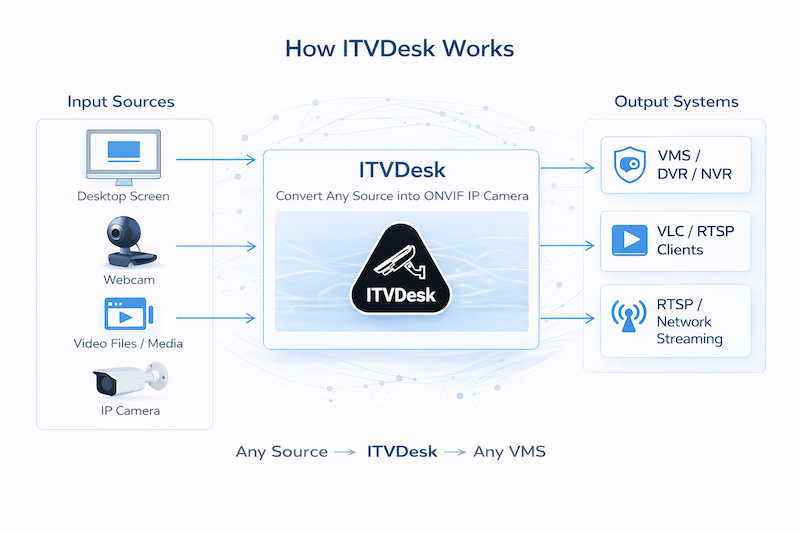
So funktioniert ITVDesk

Jede Quelle → ITVDesk → jedes VMS

ITVDesk ermöglicht die Überwachung digitaler Arbeitsabläufe, die klassische Kameras nicht erfassen können. Die Software verwandelt Computer, Desktops und Videoquellen in vollständig kompatible ONVIF-IP-Kameras und streamt sie über RTSP- und ONVIF-Protokolle in bestehende VMS- oder NVR-Systeme. Dank GPU-beschleunigter Pipeline liefert ITVDesk Echtzeit-Streaming mit hoher Leistung und geringer Systemlast.

Wo ITVDesk eingesetzt wird

ITVDesk wird überall dort eingesetzt, wo digitale Prozesse gemeinsam mit klassischer Videoüberwachung überwacht werden müssen: im Einzelhandel, bei POS-Systemen, im Bankwesen, in der Produktion und in Enterprise-Umgebungen. Computerbildschirme und Videoquellen werden als ONVIF-IP-Kameras in VMS- und NVR-Systeme integriert, damit physische und digitale Arbeitsabläufe gemeinsam überwacht werden können.


POS & EINZELHANDEL

POS-Umgebungen erfordern neben klassischer Videoüberwachung auch die Überwachung digitaler Transaktionen. ITVDesk integriert Bildschirmaktivität direkt in VMS-Systeme und hilft, Transaktionsbetrug besser zu erkennen.


FERTIGUNG

In Fertigung und Produktion ist die Überwachung und Synchronisierung von Prozessen entscheidend. ITVDesk macht Produktionssysteme in Echtzeit sichtbar, indem digitale Daten in Videoüberwachungsumgebungen integriert werden.


BANKWESEN

Im Bankwesen müssen digitale Arbeitsplätze und Transaktionen zuverlässig überwacht werden. ITVDesk ermöglicht die Integration von Bildschirmaktivitäten in bestehende Sicherheits- und VMS-Systeme.


CASINOS

ITVDesk ergänzt die Überwachung in Casinos, indem digitale Bildschirme und Systeme direkt in den Kontrollraum gestreamt und mit vorhandenen Kamerabildern kombiniert werden.


BILDUNG

ITVDesk unterstützt die Überwachung digitaler Aktivitäten während Prüfungen, Schulungen und Vorlesungen. Mehrere Bildschirme, Webcams und Medienquellen können in ein gemeinsames Monitoringsystem eingebunden werden.


BILDSCHIRMÜBERWACHUNG

ITVDesk kann Bildschirmaktivitäten sichtbar machen, wenn digitale Abläufe dokumentiert, überwacht oder mit Videomaterial aus anderen Quellen kombiniert werden müssen.

Warum ITVDesk

ITVDesk erweitert klassische Videoüberwachung, indem digitale Videoquellen direkt in VMS- und NVR-Systeme integriert werden. Computer und Videostreams werden ohne zusätzliche Hardware in ONVIF-IP-Kameras verwandelt. Die GPU-beschleunigte Pipeline ermöglicht skalierbares Monitoring mit hoher Leistung und geringer CPU-Auslastung.


MULTIPLATFORM

ITVDesk unterstützt Windows, macOS und Linux und ist als flexible, modulare Lösung für kleine POS-Installationen ebenso geeignet wie für größere Enterprise-Umgebungen.


ZWEI-WEGE-AUDIO

ITVDesk ermöglicht Zwei-Wege-Audio zwischen Operatoren und entfernten Systemen und unterstützt so direkte Interaktion innerhalb von VMS- und NVR-Umgebungen.


MULTISCREEN

ITVDesk kann mehrere Computerbildschirme und Videoquellen in einem Stream kombinieren oder als separate ONVIF-IP-Kamera-Kanäle bereitstellen.


HOHE LEISTUNG

ITVDesk nutzt eine vollständig GPU-beschleunigte Pipeline (GPU_ZERO), bei der Aufnahme, Verarbeitung und Codierung direkt auf der GPU ausgeführt werden. Das ermöglicht leistungsfähiges Streaming mit sehr geringer CPU-Last.


ONVIF PROFILE S / T / G

ITVDesk unterstützt ONVIF Profile S, T und G für Kompatibilität mit VMS- und NVR-Systemen, inklusive RTSP-Streaming, H.264, H.265, JPEG/MJPEG, PTZ-Steuerung, Ereignissen, Edge Recording und HTTPS-Kommunikation.


FÜR SICHERHEIT ENTWICKELT

ITVDesk unterstützt lokale Verschlüsselung von Benutzerdaten sowie sichere Kommunikation über HTTPS, RTSPS und SRTP. Authentifizierung und Zugriffsschutz basieren auf ONVIF-Standards, und die Software ist digital signiert.

Kompatibel mit führenden VMS- und NVR-Plattformen

Bewährt in der Integration mit führenden VMS- und NVR-Systemen

POS und Einzelhandel

ITVDesk

ITVDesk für POS und Einzelhandel

ITVDesk integriert Kassensysteme, POS-Bildschirme und digitale Transaktionsdaten in VMS- und NVR-Umgebungen und unterstützt die Untersuchung von Vorfällen und Transaktionen.

Typische Anwendung

ITVDesk wird eingesetzt, wenn digitale Aktivitäten gemeinsam mit klassischem Videomaterial überwacht, aufgezeichnet oder später analysiert werden müssen.

Nutzen

  • Integration digitaler Quellen in bestehende VMS/NVR-Systeme
  • ONVIF- und RTSP-kompatible Bereitstellung
  • Keine zusätzliche Kamera-Hardware erforderlich
  • Bessere Nachvollziehbarkeit von Bildschirm- und Prozessaktivitäten

Sicherheit und Betrieb

ITVDesk unterstützt sichere Kommunikationsoptionen wie HTTPS, RTSPS und SRTP sowie lokale Verschlüsselung von Benutzerdaten.

ITVDesk - Virtuelle ONVIF IP-Kamera Software

ITVDesk - Virtuelle ONVIF IP-Kamera Software

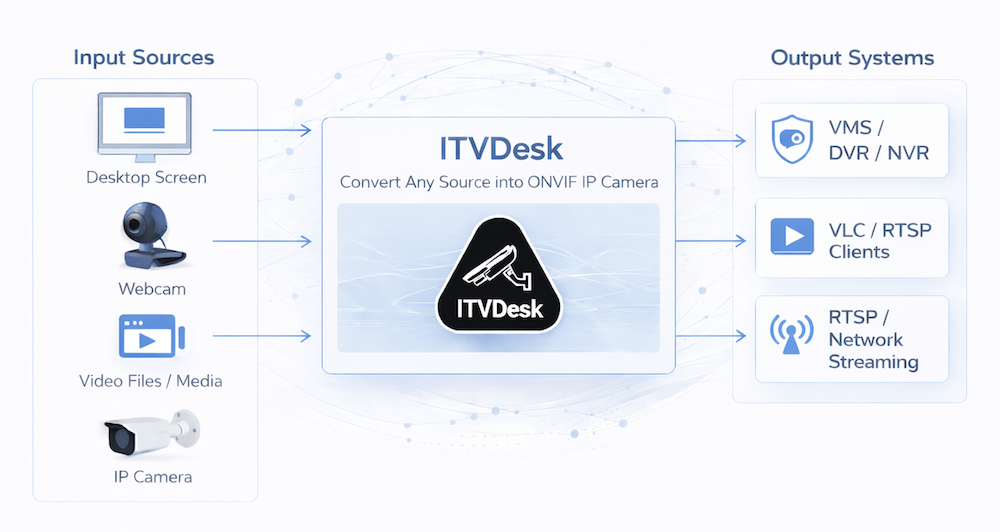
ITVDesk verwandelt jeden Computer in eine vollständig kompatible ONVIF-IP-Kamera. Desktop, Webcams, Audio, Dateien und externe IP-Kameras können in Echtzeit direkt in VMS- und NVR-Systeme gestreamt werden.

Ideal für Remote Monitoring, IT-Sicherheit, Arbeitsplatzüberwachung und die Integration nicht standardisierter Videoquellen in professionelle Videoüberwachungssysteme.

Überblick

Funktionsweise von ITVDesk

Kernfunktionen

  • Vollständige ONVIF-Unterstützung (Profile S, T, G, M)
  • RTSP / RTP / SRTP / RTSPS Streaming
  • H.265 (HEVC), H.264 und MJPEG Video-Encoding
  • Hardware- und Softwareverarbeitung mit GPU-beschleunigtem Encoding/Decoding und CPU-Fallback
  • Zwei-Wege-Audio (Audio Back Channel)
  • PTZ-Desktopsteuerung mit Maus- und Tastaturinteraktion
  • Bewegungserkennung über Tastatur- und Mausaktivität
  • Alarm-IN / Alarm-OUT Integration
  • Multi-Stream-Unterstützung (Main, Sub, Custom)
  • Automatische Erkennung über WS-Discovery
  • Sichere Kommunikation über HTTPS, SRTP und moderne Hash-/Schutzmechanismen

Medienquellen

  • Desktop-Streaming mit Multi-Monitor-Unterstützung
  • Windows-Anwendungsstreaming für einzelne Programmfenster
  • Webcam-Streaming mit mehreren Geräten, HDMI-Quellen und Smartphone-Kameras
  • Audio-only Streaming für Systemsound und Mikrofon
  • Videodatei-Streaming (*.mp4, *.flv und weitere Formate)
  • Kombinierte Streams zum Zusammenführen mehrerer Quellen in einen Ausgabekanal
  • Externe IP-Kameras über RTSP, RTMP und HTTP MJPEG
  • Externe ONVIF-Geräte als virtuelle ONVIF-Kamera
  • RTSP-Pusher Streams für FFmpeg und externe Encoder
  • Audio-/Video-Mixing zur Kombination beliebiger Audio- und Videoquellen

Unterstützte Quellen: bis zu 256 (16 Geräte x 16 Kanäle)

Multi-Channel- und Multi-Camera-Architektur

Multi-Channel-Modus:

Ein ONVIF-Gerät mit mehreren Videokanälen. Beispiel: 2 Monitore + 3 Webcams = 5 Kanäle in einem Gerät.

Multi-Camera-Modus:

Jede Quelle wird zu einer separaten ONVIF-Kamera mit eigenem Port. Beispiel: 3 Quellen = 3 IP-Kameras (Ports 7000, 7001, 7002).

Video- und Audioverarbeitung

  • Hardware-beschleunigtes Encoding mit GPU-Unterstützung
  • Automatisches Transcoding, Transmuxing und Transrating
  • Videofilter wie Blur, Sharp, Grayscale und Deinterlace
  • Flexible Steuerung von Auflösung und Bitrate
  • Audioformate: G.711, AAC, G.726, OPUS, G.722
  • Videorotation: Auto, Flip, 90 Grad, 180 Grad

OSD (On Screen Display)

  • Tastatureingaben als Overlay im Videostream
  • Zeit- und Datumsanzeige
  • Kanalname im Bild
  • Benutzerdefinierter Text
  • Flexible Positionierung in den Bildecken

Bewegungserkennung und Alarmsystem

  • Erkennung von Mausbewegungen
  • Erkennung von Tastaturaktivität
  • Konfigurierbare Erkennungsdauer
  • Alarm-IN für Panik- oder Ereignissignale
  • Alarm-OUT Aktionen:
    • Anwendung starten
    • System herunterfahren oder neu starten
    • System sperren

RTSP Streaming-Konfiguration

Beispiel RTSP-Stream:

rtsp://yourip:port/ipc1-stream1/screenlive

Beispiel mit Parametern:

rtsp://yourip:port/ipc1-stream1/screenlive?t=unicast&p=tcp&ve=H265&w=1920&h=1080&fps=30&vb=4000&ae=AAC&sr=44100&ch=2&srtp=1

Parameter können je nach Profil und Integrationsumgebung angepasst werden.

Sicherheit und professionelle Integration

  • HTTPS für ONVIF-Kommunikation
  • RTSPS und SRTP für geschützte Streaming-Szenarien
  • Lokaler Schutz und Verschlüsselung sensibler Benutzerdaten
  • Kompatibel mit VMS-/NVR-Workflows und ONVIF-konformen Systemen
  • Geeignet für lokale Netzwerke, geschützte Umgebungen und professionelle Installationen

ITVDesk testen oder integrieren

Verwenden Sie ITVDesk, um Computerbildschirme, Anwendungen, Webcams und externe Quellen schnell in bestehende VMS- und NVR-Systeme einzubinden.

Kostenlos testen Download ITVDesk

ITVDesk for POS & Retail | Monitor Transactions & POS Systems in VMS

ITVDesk for POS & Retail Monitoring

Retail environments depend on accurate transactions, fast checkout processes, and strong loss prevention. While traditional surveillance systems monitor customers and store areas, critical transaction activity happens on POS terminals and retail software systems.

ITVDesk bridges this gap by integrating POS screens and retail applications directly into existing video surveillance systems, providing full visibility over transactions and operator actions.
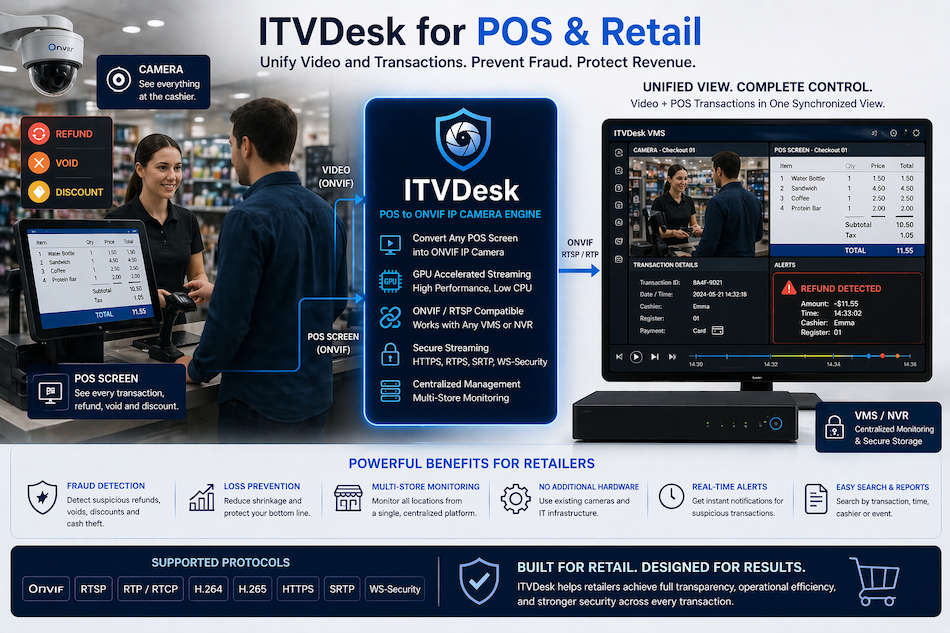
ITVDesk POS and Retail Monitoring - Video and Transaction Synchronization

ITVDesk POS & Retail Monitoring - Unified Video, POS Transactions and VMS Integration

Retail Operational Reality

Modern retail operations rely heavily on POS systems, digital payments, and real-time transaction processing. From small stores to large supermarket chains, every transaction is handled through software interfaces that are not visible in standard CCTV systems.

This creates a disconnect between what cameras capture and what actually happens during transactions, refunds, discounts, or manual overrides.

Retailers need a unified view of both customer interaction and POS activity to ensure accuracy, prevent fraud, and improve operational control.

Key Challenges

  • No visibility into POS transactions and cashier activity
  • Difficulty correlating video footage with transaction data
  • High risk of fraud, voids, and unauthorized discounts
  • Limited tools for investigation across multiple stores
  • Dependence on manual review and isolated systems

ITVDesk Approach

ITVDesk converts POS terminals and retail systems into ONVIF-compatible video streams, enabling seamless integration into existing VMS and NVR platforms.

  • Stream POS screens directly into surveillance systems
  • Record transactions alongside CCTV video
  • Synchronize cashier actions with camera footage
  • Enable centralized monitoring across multiple locations
  • Integrate without additional hardware or complex setup

This allows retailers to monitor every transaction visually and correlate it with real-world activity in real time.

Typical POS & Retail Use Cases

  • Transaction Monitoring – verify every sale, refund, and discount
  • Fraud Detection – identify suspicious cashier behavior and anomalies
  • Loss Prevention – reduce shrinkage through integrated monitoring
  • Multi-Store Supervision – monitor all POS systems from a central location
  • Incident Investigation – review synchronized video and transaction activity
  • Self-Checkout Monitoring – oversee automated checkout systems

Key Capabilities

  • ONVIF-compliant virtual POS camera integration
  • Real-time streaming and recording of POS screens
  • Multi-channel monitoring across multiple terminals
  • PTZ desktop control for remote interaction
  • Secure communication (HTTPS, SRTP, authentication)
  • Full compatibility with VMS/NVR systems

Operational Benefits

  • Full visibility into all retail transactions
  • Improved fraud detection and loss prevention
  • Faster investigation with synchronized video and POS data
  • Centralized monitoring across multiple stores
  • No additional hardware or infrastructure required

Looking for a detailed solution for cashier and transaction monitoring? View POS & Cashier Monitoring Use Case →

Turn POS Systems into Smart Surveillance Channels

Monitor transactions, cashier activity, and POS systems directly inside your surveillance platform.

Software-only solution. Fully ONVIF compatible. Ideal for retail and multi-location environments.
Download ITVDesk IP Camera

ITVDesk Download Center

Download ITVDesk Virtual ONVIF IP Camera Software

Install ITVDesk and turn a computer screen, webcam, media file, RTSP stream, or external ONVIF source into a virtual ONVIF IP camera for VMS and NVR systems.

Latest version: v9.8.3 Windows / Linux / macOS 7-day free trial Release notes: 17 May
Windows
Recommended

Windows 64-bit

Latest ITVDesk Pro release for modern Windows systems.

Version
v9.8.3
Size
119 MB
Legacy Windows 32-bit The 32-bit Windows build is deprecated and intended only for legacy systems such as Windows 7 or 8. It is no longer supported for current deployments. Download legacy v7.7.4
Linux
Portable

Linux AppImage

Portable ITVDesk package suitable for most Linux distributions.

Version
v7.5
Size
97 MB
Run instantly chmod a+x ITVDesk*.AppImage
./ITVDesk*.AppImage
macOS
Apple Silicon

macOS

ITVDesk package for Apple Silicon macOS systems.

Version
v9.5.0
Size
95 MB
Open the .dmg file and drag ITVDesk.app into Applications.

Hardware acceleration

ITVDesk supports GPU acceleration with Intel QSV, NVIDIA NVENC, and AMD AMF. GPU-assisted H.264 / H.265 encoding, scaling, color conversion, and video processing help reduce system load, with optimized CPU fallback for compatibility.

Tools and utilities

Additional utilities include free ports, VC++ Redistributable, and supporting documentation for Windows deployments.

Download tools package