Le panier est vide

Security & Compliance

ITVDesk is committed to delivering secure and reliable software for professional and enterprise environments. Our products are developed following modern security standards, including encryption, code signing, and controlled update mechanisms.

itvdesk and digicert
Cyber Resilience Act (CRA) Readiness

As part of our continuous improvement, ITVDesk has aligned its processes with the upcoming EU Cyber Resilience Act (Regulation EU 2023/0273).

  • ✅ EV Code Signing Certificate (ITVDesk >= v8.6)
  • ✅ Secure Update Policy and version validation
  • ✅ Software Bill of Materials (SBOM)
  • ✅ Vulnerability Disclosure Policy (VDP)
  • ✅ Declaration of Conformity (DoC)
  • ✅ Incident response and contact process

For more details, please visit:


🛡️ EU CRA READY – Certified Software
Declaration of Conformity issued: October 2025


Obtenez 15 jours d'essai gratuit
Essayez ITVDesk avec une licence gratuite !


  1. Télécharger ITVDesk
  2. Installer ITVDesk
  3. appuyer sur Tray Free Now.
    (Nous respectons votre vie privée et n'avons pas à laisser vos données personnelles pour générer une licence comme : e-mail, adresse, etc.)itvdesk 5 7LicShowTrial

La licence sera automatiquement téléchargée à partir d'Internet. Si vous n'avez pas accès à Internet, envoyez-nous un e-mail et nous vous l'enverrons.


Activities and content that children practice and cosume online are one of the main concerns of every parent. While there are many applications that provide partial control of your child’s digital activities, there are many aspects of computer usage that are potentially dangerous and require supervision of your child’s screen activities.

ITVDesk is an excellent solution for parental control. It streams your kid’s PC screen and webcam so you can monitor their activity without them knowing it. With ITVDesk you can rest assured that your kid is protected from any kind of dangerous activity. You can supervise their screen activity in real time and control how much screen time they have when you are not at home.

Introduction


The ITVDesk ONVIF IPCam can use your graphics chip (a.k.a. GPU) to accelerate decoding of video streams depending on the graphic card model and operating system. In some cases, it can let the graphic card perform post-processing and rendering of the decoded video. In any case, this frees the main processor (i.e. CPU) of some of the most computationally heavy sub-tasks involved in playing external media source like From File and External IP Camera media playing video.

Activation


To enable hardware accelerated decoding, use the ITVDesk preferences. By default, hardware acceleration is enabled. In ITVDesk version 5.4, you can select which acceleration method you wish to use among those available for your operating system (if any).

Les activités et contenus que les enfants pratiquent et consomment en ligne sont l'une des principales préoccupations de chaque parent. Bien qu'il existe de nombreuses applications qui offrent un contrôle partiel des activités numériques de votre enfant, de nombreux aspects de l'utilisation de l'ordinateur sont potentiellement dangereux et nécessitent une surveillance des activités de votre enfant sur l'écran.

ITVDesk est une excellente solution pour le contrôle parental. Il diffuse l'écran du PC et la webcam de votre enfant afin que vous puissiez surveiller son activité sans qu'il le sache. Avec ITVDesk, vous pouvez être assuré que votre enfant est protégé contre tout type d'activité dangereuse. Vous pouvez superviser leur activité d'écran en temps réel et contrôler le temps d'écran dont ils disposent lorsque vous n'êtes pas à la maison.


ITVDesk prend en charge jusqu'à 100 flux simultanés et 16 caméras IP ONVIF virtuelles parallèles.

Principales caractéristiques

 Prise en charge de la diffusion de vidéos à partir de la webcam, de l'écran en direct, de l'audio uniquement, du fichier, des flux combinés, de la caméra IP externe...
   - Prise en charge des flux vidéo en streaming H265, H264, MP4, MJPEG.
   - Prise en charge du streaming audio G711, G722, G726, AAC.
   - Prise en charge de la configuration des paramètres de sortie audio et vidéo.
   - Prise en charge de la connexion à une source multimédia externe, inclut les flux RTSP, RTMP et HTTP MJPEG et conversion en profil de caméra IP ONVIF T.

Prend en charge RTP sur UDP, TCP.
Prend en charge la fonction RTSP sur HTTP/HTTPS.
Prise en charge de la connexion externe multimédia, notamment les flux RTSP (tcp, utp, multidiffusion), RTMP et HTTP MJPEG.
Prend en charge la fonction RTSP sur Websocket.
Prend en charge la fonction de lecture audio/vidéo ONVIF.
Prend en charge le canal arrière audio.
Prend en charge la fonction de multidiffusion RTP.
Transcodage automatique.
Décodage par accélération matérielle.
RTSP sur HTTP et HTTPS

La clé de RTSP sur HTTP est de permettre aux paquets RTSP de communiquer via le port HTTP. Le port standard de RTSP est 554, mais en raison de diverses configurations de politique de sécurité telles que les pare-feu, il peut y avoir des restrictions lorsque le client accède au port 554, ce qui empêche la transmission normale des paquets RTSP. Mais le port HTTP (port 80) est généralement ouvert, il y a donc l'idée de laisser passer les paquets RTSP par le port 80, à savoir RTSP sur HTTP.

RTSP sur Websocket

Le protocole WebSocket fournit essentiellement une communication bidirectionnelle entre le client et le serveur pour l'application Web. Ceci décrit comment une connexion WebSocket peut être établie entre un client et un serveur.

Exemple d'impression du journal ITVDesk Geek : WebSocket Handshake
Cet exemple montre le transfert de messages entre un client Web (client) et un serveur Web (serveur). Le client demande au serveur d'initier une connexion WebSocket à l'aide de l'URI WebSocket. Le WebSocket Uri peut être récupéré à l'aide de la commande GetServiceCapabilities du service ONVIF Media2. Un exemple de WebSocketURI peut ressembler à « ws ://192.168.88.1/webSocketServer »
 
CLIENT-->SERVEUR :
OBTENIR /websocket HTTP/1.1
Hôte : 192.168.88.28
Mise à niveau : prise Web
Connexion : mise à niveau
Clé Sec-WebSocket : KSO+hOFs1q5SkEnx8q5564nkE
Origine : http://192.168.88.28
Sec-WebSocket-Protocole : rtsp.onvif.org
Sec-WebSocket-Version : 13

SERVEUR-->CLIENT :
HTTP/1.1 101 protocoles de commutation
Mise à niveau : prise Web
Connexion : mise à niveau
Sec-WebSocket-Accepter : KSO+hOFs1q5564nkEnx8bvp6w==
Sec-WebSocket-Protocole : rtsp.onvif.org
Sec-WebSocket-Version : 13

Une fois la mise à niveau du protocole réussie, effectuez un échange de protocole RTSP standard et envoyez et recevez des données via une connexion Websocket.

Décodage d'accélération Hadware

L'accélération matérielle est une méthode permettant d'accélérer le traitement informatique en transférant le travail vers une partie de l'ordinateur capable de faire le travail plus rapidement. L'accélération matérielle pour ITVDesk fait généralement référence à l'utilisation de votre carte graphique GPU pour de meilleures performances. Voir décodage GPU.


ITVDesk est une option de surveillance idéale pour le domaine de l'éducation. Combiné avec d'autres appareils photo, il permet une supervision précise de l'activité des étudiants pendant les examens et les cours. Comme dans tous les autres domaines, lorsqu'il est utilisé dans l'éducation, ITVDesk diffuse simultanément différents écrans, webcams et médias, en les combinant tous sur un seul écran pour une vue d'ensemble complète.

ITVDesk est également une excellente solution logicielle pour surveiller l'activité informatique de la bibliothèque.


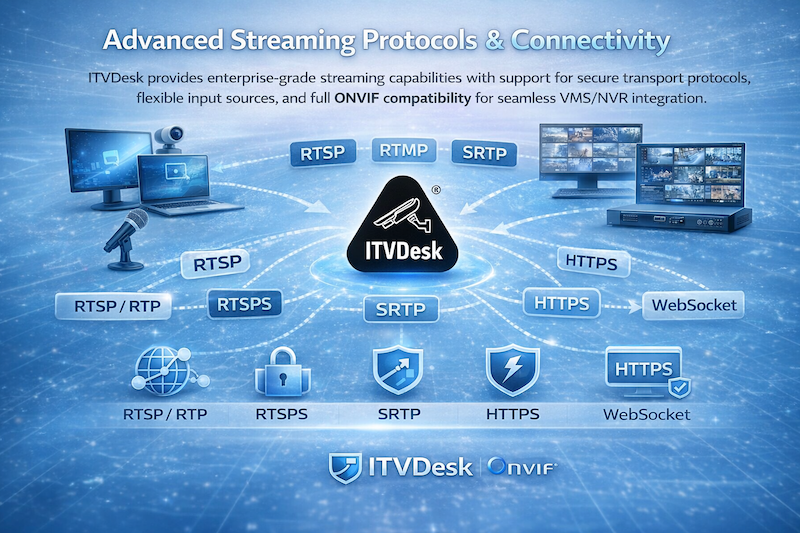
Advanced Streaming Protocols & Connectivity

ITVDesk provides enterprise-grade streaming capabilities with support for secure transport protocols, flexible input sources, and full ONVIF compatibility for seamless VMS/NVR integration.

Universal Video Source Integration

ITVDesk can stream video from multiple sources including desktop screens, applications, webcams, audio-only inputs, files, external IP cameras, and combined multi-source layouts. All sources can be exposed as standard ONVIF IP cameras, ensuring compatibility with leading VMS and NVR systems.

Supported Video Formats

H.264, H.265 (HEVC), MJPEG, MP4 with configurable encoding parameters for bitrate, resolution, and quality.

Audio Support

G711, G722, G726, AAC with support for two-way audio (audio backchannel) in ONVIF environments.

Automatic Transcoding

Incoming streams can be automatically converted and optimized for compatibility with VMS systems.

Streaming Protocol Support

ITVDesk supports a wide range of streaming protocols, allowing flexible integration into existing infrastructure while ensuring compatibility with enterprise video surveillance systems.

Advance Streaming Protocols Connectivity

RTSP / RTP

Full support for RTSP streaming over TCP and UDP, including multicast distribution for scalable deployments.

RTSP over HTTP / HTTPS

Enables RTSP traffic over standard web ports, allowing streaming through firewalls and restricted networks.

RTSPS (Secure RTSP)

Secure RTSP communication using TLS encryption for protected video transmission in sensitive environments.

SRTP

Secure Real-time Transport Protocol ensures encrypted media streams with integrity and confidentiality.

HTTPS

Secure communication for control, configuration, and ONVIF services using HTTPS protocols.

WebSocket (RTSP over WebSocket)

Enables bidirectional communication and RTSP streaming over WebSocket connections for modern web environments.

Enterprise Security & Reliability

ITVDesk is built for secure environments where data protection and reliable streaming are critical. Support for encrypted protocols such as RTSPS, SRTP, and HTTPS ensures that video and control data remain protected during transmission.

Flexible Input and Output Architecture

ITVDesk supports integration with external media sources including RTSP, RTMP, and HTTP MJPEG streams. These sources can be converted into ONVIF-compatible streams, allowing seamless use within VMS systems.

Advanced configuration options allow control over resolution, bitrate, codecs, transport protocols, and metadata parameters to match specific deployment requirements.

What This Means in Practice

  • Secure video streaming using modern encryption protocols
  • Seamless integration with ONVIF-compatible VMS/NVR systems
  • Flexible deployment across different network environments
  • Reliable streaming even behind firewalls and restricted networks
  • Support for complex multi-source and enterprise use cases

Enterprise-Ready Streaming Platform

ITVDesk delivers a powerful and flexible streaming platform designed for modern video surveillance systems, combining protocol compatibility, security, and performance in a single solution.

ITVDesk offre un niveau de protection ultime pour les casinos. Avec ITVDesk, les écrans de toutes les machines sont enregistrés et diffusés dans la salle de contrôle du casino. Combiné avec des images d'autres caméras dans la salle, vous pouvez suivre toutes les activités qui se déroulent dans le casino.

De plus, ITVDesk surveille également les écrans de la salle de contrôle. De cette façon, vous pouvez superviser la supervision - rien ne passe inaperçu. Si un incident survient, vous pourrez voir exactement ce qui était affiché sur les écrans des opérateurs au moment de l'incident.

Tout comme pour les parties où se trouvent le restaurant ou le bar, ITVDesk assure également la surveillance de cette partie du casino.

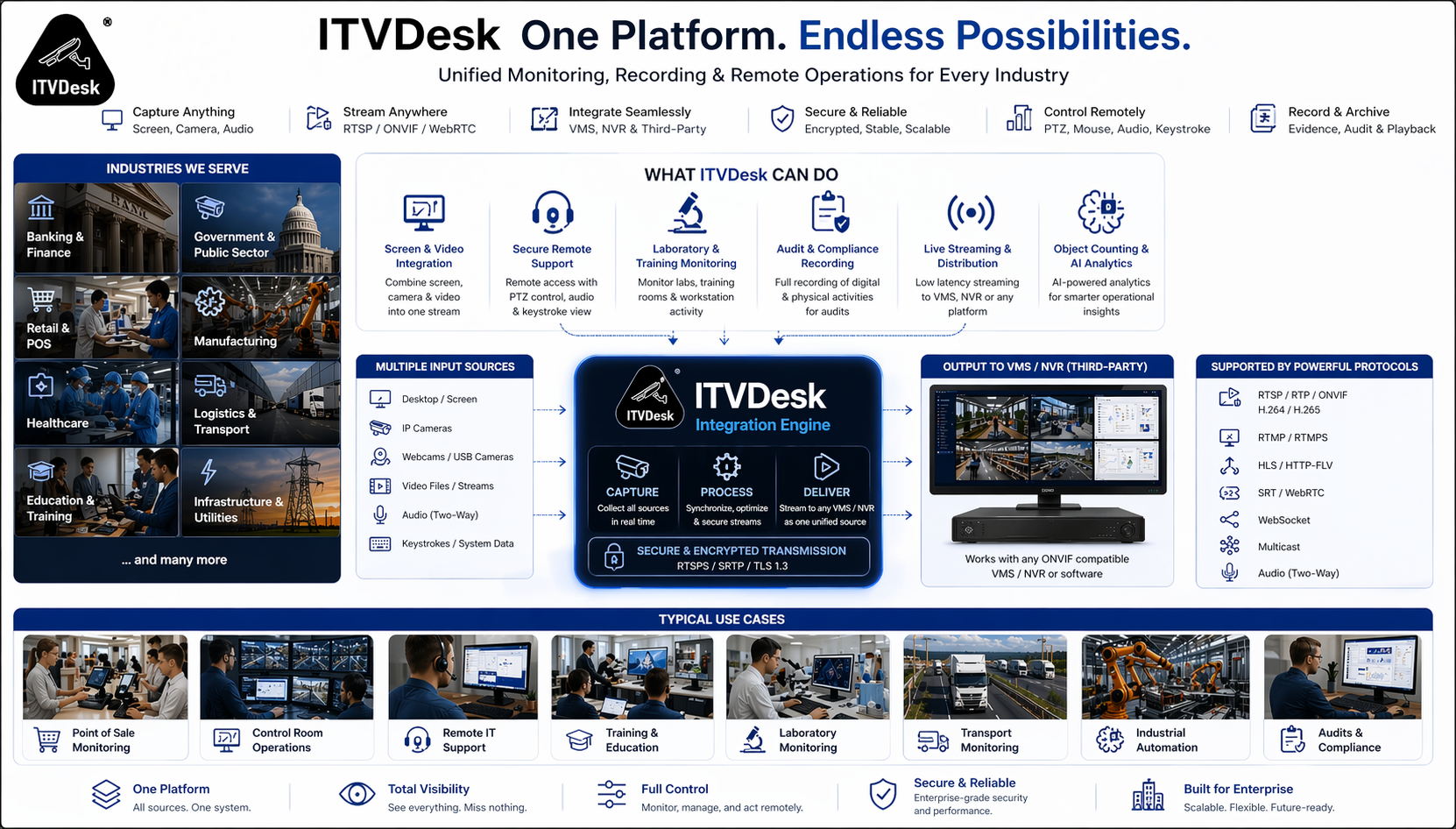
Industries & Applications

ITVDesk is a professional software solution that transforms computers, applications, and digital systems into ONVIF IP cameras, enabling full integration into VMS and NVR environments.

It is used across industries where monitoring is no longer limited to physical cameras, but also requires visibility into digital workflows, operator activity, and system interfaces.

ITVDesk Industries - Unified Monitoring Across Multiple Industries

One platform for monitoring digital and video workflows across multiple industries and use cases

Beyond Traditional Surveillance

Modern operations rely heavily on digital systems — including transaction platforms, operator consoles, industrial control panels, remote sessions, and business applications.

Standard IP cameras cannot capture these environments. ITVDesk bridges this gap by converting any digital source into a fully ONVIF-compatible video stream.

This allows organizations to monitor, record, and manage all activities inside a unified surveillance platform.

What Can Be Monitored

  • Desktop screens (multi-monitor systems)
  • Windows applications and software interfaces
  • POS terminals and transaction systems
  • ATM and kiosk systems
  • Remote desktop and support sessions
  • Control room and NOC dashboards
  • Webcams, HDMI devices, and external inputs
  • IP cameras and RTSP/ONVIF streams

Core Industries

ITVDesk is widely used in high-security and enterprise environments where monitoring, compliance, and operational visibility are critical.

Banking & Finance

Monitor transaction systems, ATM interfaces, and back-office operations alongside surveillance video.

Government & Public Sector

Enable monitoring of administrative systems, service counters, and secure operational environments.

Healthcare

Supervise medical systems, laboratory interfaces, and sensitive digital environments.

Critical Infrastructure

Monitor SCADA systems, industrial control panels, and operational terminals.

Data Centers & NOC

Track operator activity, dashboards, and real-time system monitoring.

Commercial & Operational Industries

Retail & POS

Combine transaction data and video surveillance to detect fraud and operational issues.

Manufacturing

Monitor production systems and operator terminals in industrial environments.

Logistics & Transport

Track warehouse systems, dispatch operations, and transport workflows.

Education

Monitor classrooms, exams, and digital learning environments.

Casinos & Gaming

Capture gaming systems, terminals, and digital operations alongside video feeds.

Advanced Use Cases

Compliance & Audit Recording

Record system activity for regulatory compliance and audit tracking.

Remote Monitoring

Monitor remote employees and distributed operations.

Control Room Monitoring

Integrate operator screens into video walls and VMS systems.

Incident Investigation

Replay screen and camera activity together for full analysis.

Streaming & Integration

Convert any source into ONVIF stream for integration with surveillance systems.

Remote Support & Intervention

Enable real-time support with video and audio interaction.

One Platform for Physical and Digital Surveillance

ITVDesk extends your existing VMS and NVR systems beyond cameras, allowing full visibility into digital environments, operator activity, and system workflows.

Software-only solution. Fast deployment. Enterprise-ready.

There are very few industries that rely on monitoring as much as banking. Due to a very high vulnerability to frauds, superior surveillance of all computers in the system is required.

ITVDesk helps increase level of transparency in banking system. It turns every computer into a virtual IP camera, streaming computer screen and webcam into your existing VMS or NVR video surveillance system. That way, you can observe activities captured by security camera with activities performed on computer screen simultaneously.

ITVDesk is also used for ATMs. It streams ATM screen and camera into video surveillance system, thus ensuring better protection for your customers. In case of any kind of damage, ITVDesk provides evidence showing both ATM screen and the person using it in real time.