Su pedido está vacío

Security & Compliance

ITVDesk is committed to delivering secure and reliable software for professional and enterprise environments. Our products are developed following modern security standards, including encryption, code signing, and controlled update mechanisms.

itvdesk and digicert
Cyber Resilience Act (CRA) Readiness

As part of our continuous improvement, ITVDesk has aligned its processes with the upcoming EU Cyber Resilience Act (Regulation EU 2023/0273).

  • ✅ EV Code Signing Certificate (ITVDesk >= v8.6)
  • ✅ Secure Update Policy and version validation
  • ✅ Software Bill of Materials (SBOM)
  • ✅ Vulnerability Disclosure Policy (VDP)
  • ✅ Declaration of Conformity (DoC)
  • ✅ Incident response and contact process

For more details, please visit:


🛡️ EU CRA READY – Certified Software
Declaration of Conformity issued: October 2025


Obtenga 15 días de prueba gratuita
Pruebe ITVDesk con una licencia gratuita !


  1. Descargar ITVDesk
  2. Instalar en pc ITVDesk
  3. Press on Tray Free Now.
    (Respetamos su privacidad y no tenemos que dejar ningún dato personal suyo para generar una licencia como: correo electrónico, dirección, etc.)itvdesk 5 7LicShowTrial

La licencia se descargará automáticamente de Internet. Si no tiene acceso a Internet, envíenos un correo electrónico y se lo enviaremos.


Activities and content that children practice and cosume online are one of the main concerns of every parent. While there are many applications that provide partial control of your child’s digital activities, there are many aspects of computer usage that are potentially dangerous and require supervision of your child’s screen activities.

ITVDesk is an excellent solution for parental control. It streams your kid’s PC screen and webcam so you can monitor their activity without them knowing it. With ITVDesk you can rest assured that your kid is protected from any kind of dangerous activity. You can supervise their screen activity in real time and control how much screen time they have when you are not at home.

Introduction


The ITVDesk ONVIF IPCam can use your graphics chip (a.k.a. GPU) to accelerate decoding of video streams depending on the graphic card model and operating system. In some cases, it can let the graphic card perform post-processing and rendering of the decoded video. In any case, this frees the main processor (i.e. CPU) of some of the most computationally heavy sub-tasks involved in playing external media source like From File and External IP Camera media playing video.

Activation


To enable hardware accelerated decoding, use the ITVDesk preferences. By default, hardware acceleration is enabled. In ITVDesk version 5.4, you can select which acceleration method you wish to use among those available for your operating system (if any).


Las actividades y el contenido que los niños practican y consumen en línea son una de las principales preocupaciones de todos los padres. Si bien hay muchas aplicaciones que brindan un control parcial de las actividades digitales de su hijo, hay muchos aspectos del uso de la computadora que son potencialmente peligrosos y requieren la supervisión de las actividades de la pantalla de su hijo.

ITVDesk es una excelente solución para el control parental. Transmite la pantalla de la PC y la cámara web de su hijo para que pueda monitorear su actividad sin que ellos lo sepan. Con ITVDesk, puede estar seguro de que su hijo está protegido de cualquier tipo de actividad peligrosa. Puedes supervisar su actividad en la pantalla en tiempo real y controlar cuánto tiempo de pantalla tienen cuando no estás en casa.


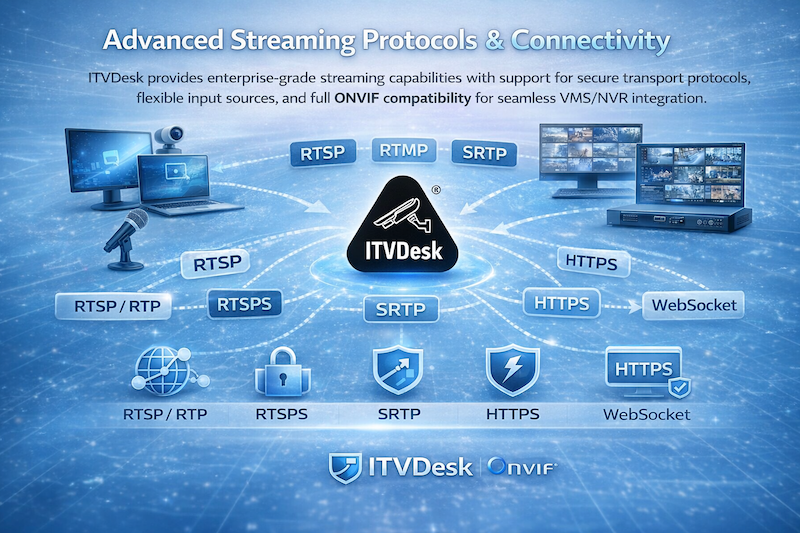
Advanced Streaming Protocols & Connectivity

ITVDesk provides enterprise-grade streaming capabilities with support for secure transport protocols, flexible input sources, and full ONVIF compatibility for seamless VMS/NVR integration.

Universal Video Source Integration

ITVDesk can stream video from multiple sources including desktop screens, applications, webcams, audio-only inputs, files, external IP cameras, and combined multi-source layouts. All sources can be exposed as standard ONVIF IP cameras, ensuring compatibility with leading VMS and NVR systems.

Supported Video Formats

H.264, H.265 (HEVC), MJPEG, MP4 with configurable encoding parameters for bitrate, resolution, and quality.

Audio Support

G711, G722, G726, AAC with support for two-way audio (audio backchannel) in ONVIF environments.

Automatic Transcoding

Incoming streams can be automatically converted and optimized for compatibility with VMS systems.

Streaming Protocol Support

ITVDesk supports a wide range of streaming protocols, allowing flexible integration into existing infrastructure while ensuring compatibility with enterprise video surveillance systems.

Advance Streaming Protocols Connectivity

RTSP / RTP

Full support for RTSP streaming over TCP and UDP, including multicast distribution for scalable deployments.

RTSP over HTTP / HTTPS

Enables RTSP traffic over standard web ports, allowing streaming through firewalls and restricted networks.

RTSPS (Secure RTSP)

Secure RTSP communication using TLS encryption for protected video transmission in sensitive environments.

SRTP

Secure Real-time Transport Protocol ensures encrypted media streams with integrity and confidentiality.

HTTPS

Secure communication for control, configuration, and ONVIF services using HTTPS protocols.

WebSocket (RTSP over WebSocket)

Enables bidirectional communication and RTSP streaming over WebSocket connections for modern web environments.

Enterprise Security & Reliability

ITVDesk is built for secure environments where data protection and reliable streaming are critical. Support for encrypted protocols such as RTSPS, SRTP, and HTTPS ensures that video and control data remain protected during transmission.

Flexible Input and Output Architecture

ITVDesk supports integration with external media sources including RTSP, RTMP, and HTTP MJPEG streams. These sources can be converted into ONVIF-compatible streams, allowing seamless use within VMS systems.

Advanced configuration options allow control over resolution, bitrate, codecs, transport protocols, and metadata parameters to match specific deployment requirements.

What This Means in Practice

  • Secure video streaming using modern encryption protocols
  • Seamless integration with ONVIF-compatible VMS/NVR systems
  • Flexible deployment across different network environments
  • Reliable streaming even behind firewalls and restricted networks
  • Support for complex multi-source and enterprise use cases

Enterprise-Ready Streaming Platform

ITVDesk delivers a powerful and flexible streaming platform designed for modern video surveillance systems, combining protocol compatibility, security, and performance in a single solution.


ITVDesk es una opción de vigilancia ideal para el campo educativo. Combinado con otro material de cámara, proporciona una supervisión precisa de la actividad de los estudiantes durante los exámenes y conferencias. Al igual que en todos los demás campos, cuando se usa en educación, ITVDesk transmite diferentes pantallas, cámaras web y medios simultáneamente, combinándolos todos en una pantalla para obtener una descripción completa.

ITVDesk también es una excelente solución de software para monitorear la actividad de la computadora de la biblioteca.


ITVDesk admite hasta 100 transmisiones simultáneas y 16 cámaras IP ONVIF virtuales paralelas.

Caracteristicas clave

 Soporte para transmisión de video desde cámara web, pantalla en vivo, solo audio, desde archivo, transmisiones combinadas, cámara IP externa ...
   - Soporte para transmisiones de video H265, H264, MP4, MJPEG.
   - Soporte para transmisión de audio G711, G722, G726, AAC.
   - Soporte para configurar parámetros de salida de audio y video.
   - Soporte para conectarse a una fuente de medios externa, incluye RTSP, RTMP y HTTP MJPEG stream y convertir a ONVIF IP Camera Profile T.
Admite RTP sobre UDP, TCP.
Admite RTSP sobre la función HTTP / HTTPS.
Admite conexión externa de medios, incluye RTSP (tcp, utp, multicast), RTMP y HTTP MJPEG stream.
Admite la función RTSP sobre Websocket.
Admite la función de reproducción de audio / video ONVIF.
Soporte de canal trasero de audio.
Admite la función de multidifusión RTP.
Transcodificación automática.
Decodificación de aceleración de hardware.
RTSP sobre HTTP y HTTPS

La clave de RTSP sobre HTTP es permitir que los paquetes RTSP se comuniquen a través del puerto HTTP. El puerto estándar de RTSP es 554, pero debido a varias configuraciones de políticas de seguridad, como firewalls, puede haber restricciones cuando el cliente accede al puerto 554, lo que impide la transmisión normal de paquetes RTSP. Pero el puerto HTTP (puerto 80) generalmente está abierto, por lo que existe la idea de dejar que los paquetes RTSP pasen por el puerto 80, es decir, RTSP sobre HTTP.

RTSP sobre Websocket

El protocolo WebSocket básicamente proporciona comunicación bidireccional entre el Cliente y el Servidor para la aplicación web. Esto describe cómo se puede establecer una conexión WebSocket entre un cliente y un servidor.

Ejemplo de impresión de ITVDesk Geek Log: WebSocket Handshake
Este ejemplo muestra la transferencia de mensajes entre un cliente web (cliente) y un servidor web (servidor). El cliente solicita al servidor que inicie una conexión WebSocket utilizando el URI de WebSocket. El Uri de WebSocket se puede recuperar mediante el comando GetServiceCapabilities del servicio ONVIF Media2. Un ejemplo de WebSocketURI puede verse como, "ws: / /192.168.88.1/webSocketServer"
 
CLIENTE -> SERVIDOR:
OBTENER / websocket HTTP / 1.1
Anfitrión: 192.168.88.28
Actualización: websocket
Conexión: actualización
Sec-WebSocket-Key: KSO + hOFs1q5SkEnx8q5564nkE
Origen: http://192.168.88.28
Sec-WebSocket-Protocol: rtsp.onvif.org
Sec-WebSocket-Versión: 13

SERVIDOR -> CLIENTE:
HTTP / 1.1 101 protocolos de conmutación
Actualización: websocket
Conexión: actualización
Sec-WebSocket-Accept: KSO + hOFs1q5564nkEnx8bvp6w ==
Sec-WebSocket-Protocol: rtsp.onvif.org
Sec-WebSocket-Versión: 13

Después de que la actualización del protocolo sea exitosa, realice un intercambio de protocolo RTSP estándar y envíe y reciba datos a través de la conexión websocket.


Decodificación de aceleración de hadware


La aceleración de hardware es un método para acelerar el procesamiento de la computadora al cambiar el trabajo a una parte de la computadora que puede hacer el trabajo más rápido. La aceleración de hardware para ITVDesk generalmente se refiere al uso de su tarjeta gráfica GPU para un mejor rendimiento. Ver decodificación de GPU.
 

ITVDesk proporciona el máximo nivel de protección para casinos. Con ITVDesk, las pantallas de todas las máquinas se graban y se transmiten a la Sala de Control del Casino. Combinado con imágenes de otra cámara en la habitación, puede rastrear todas las actividades que ocurren en el casino.

Además, ITVDesk también monitorea las pantallas en la Sala de Control. De esta manera puede supervisar la supervisión: nada pasa desapercibido. Si ocurre un incidente, podrá ver exactamente lo que se mostró en las pantallas del operador en el momento del incidente.

Al igual que con las partes donde se encuentra el restaurante o el bar, ITVDesk también proporciona vigilancia para esa parte del casino.


Industries & Applications

ITVDesk is a professional software solution that transforms computers, applications, and digital systems into ONVIF IP cameras, enabling full integration into VMS and NVR environments.

It is used across industries where monitoring is no longer limited to physical cameras, but also requires visibility into digital workflows, operator activity, and system interfaces.

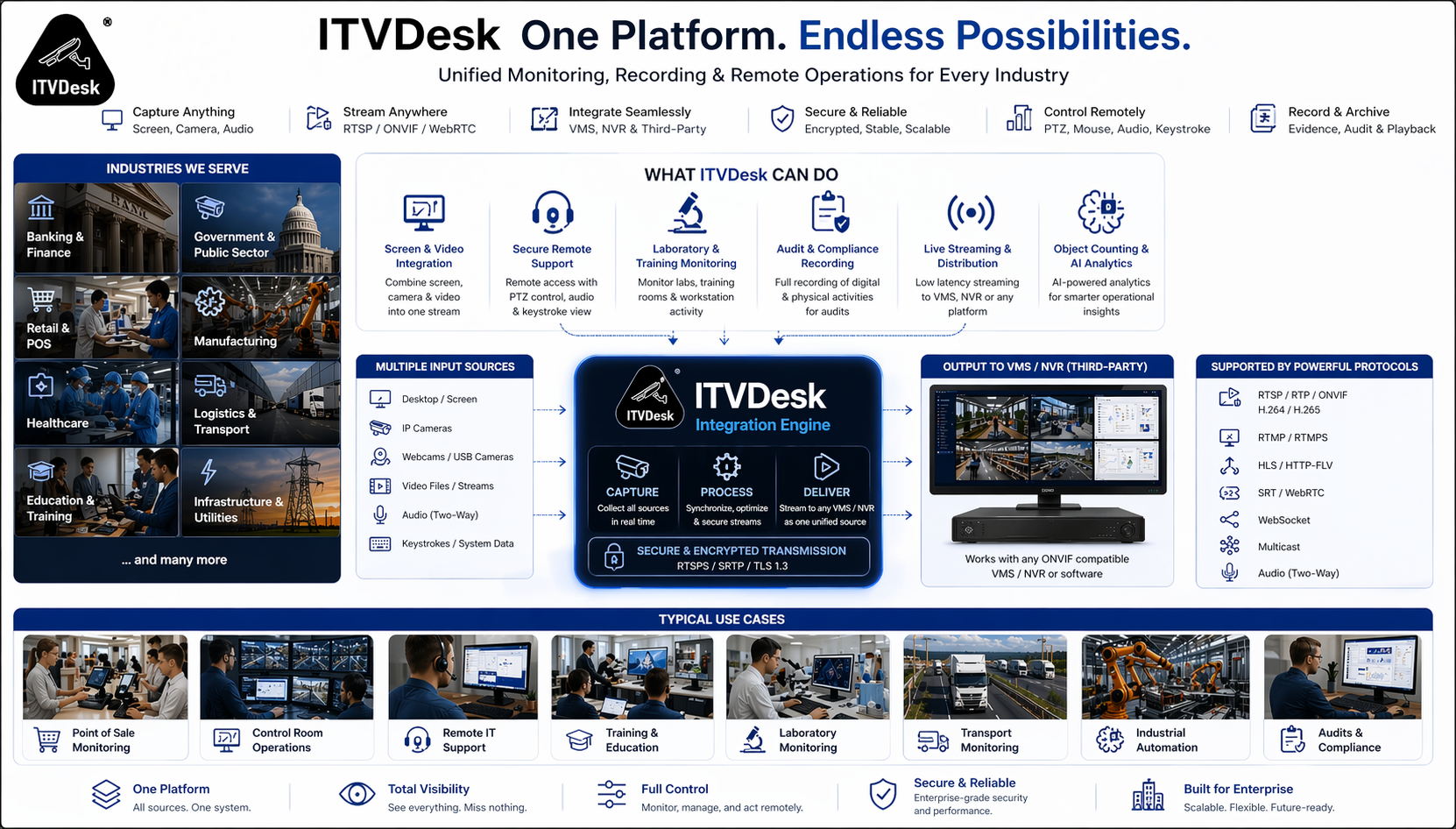
ITVDesk Industries - Unified Monitoring Across Multiple Industries

One platform for monitoring digital and video workflows across multiple industries and use cases

Beyond Traditional Surveillance

Modern operations rely heavily on digital systems — including transaction platforms, operator consoles, industrial control panels, remote sessions, and business applications.

Standard IP cameras cannot capture these environments. ITVDesk bridges this gap by converting any digital source into a fully ONVIF-compatible video stream.

This allows organizations to monitor, record, and manage all activities inside a unified surveillance platform.

What Can Be Monitored

  • Desktop screens (multi-monitor systems)
  • Windows applications and software interfaces
  • POS terminals and transaction systems
  • ATM and kiosk systems
  • Remote desktop and support sessions
  • Control room and NOC dashboards
  • Webcams, HDMI devices, and external inputs
  • IP cameras and RTSP/ONVIF streams

Core Industries

ITVDesk is widely used in high-security and enterprise environments where monitoring, compliance, and operational visibility are critical.

Banking & Finance

Monitor transaction systems, ATM interfaces, and back-office operations alongside surveillance video.

Government & Public Sector

Enable monitoring of administrative systems, service counters, and secure operational environments.

Healthcare

Supervise medical systems, laboratory interfaces, and sensitive digital environments.

Critical Infrastructure

Monitor SCADA systems, industrial control panels, and operational terminals.

Data Centers & NOC

Track operator activity, dashboards, and real-time system monitoring.

Commercial & Operational Industries

Retail & POS

Combine transaction data and video surveillance to detect fraud and operational issues.

Manufacturing

Monitor production systems and operator terminals in industrial environments.

Logistics & Transport

Track warehouse systems, dispatch operations, and transport workflows.

Education

Monitor classrooms, exams, and digital learning environments.

Casinos & Gaming

Capture gaming systems, terminals, and digital operations alongside video feeds.

Advanced Use Cases

Compliance & Audit Recording

Record system activity for regulatory compliance and audit tracking.

Remote Monitoring

Monitor remote employees and distributed operations.

Control Room Monitoring

Integrate operator screens into video walls and VMS systems.

Incident Investigation

Replay screen and camera activity together for full analysis.

Streaming & Integration

Convert any source into ONVIF stream for integration with surveillance systems.

Remote Support & Intervention

Enable real-time support with video and audio interaction.

One Platform for Physical and Digital Surveillance

ITVDesk extends your existing VMS and NVR systems beyond cameras, allowing full visibility into digital environments, operator activity, and system workflows.

Software-only solution. Fast deployment. Enterprise-ready.

There are very few industries that rely on monitoring as much as banking. Due to a very high vulnerability to frauds, superior surveillance of all computers in the system is required.

ITVDesk helps increase level of transparency in banking system. It turns every computer into a virtual IP camera, streaming computer screen and webcam into your existing VMS or NVR video surveillance system. That way, you can observe activities captured by security camera with activities performed on computer screen simultaneously.

ITVDesk is also used for ATMs. It streams ATM screen and camera into video surveillance system, thus ensuring better protection for your customers. In case of any kind of damage, ITVDesk provides evidence showing both ATM screen and the person using it in real time.