The cart is empty

Security & Compliance

ITVDesk is committed to delivering secure and reliable software for professional and enterprise environments. Our products are developed following modern security standards, including encryption, code signing, and controlled update mechanisms.

itvdesk and digicert
Cyber Resilience Act (CRA) Readiness

As part of our continuous improvement, ITVDesk has aligned its processes with the upcoming EU Cyber Resilience Act (Regulation EU 2023/0273).

  • ✅ EV Code Signing Certificate (ITVDesk >= v8.6)
  • ✅ Secure Update Policy and version validation
  • ✅ Software Bill of Materials (SBOM)
  • ✅ Vulnerability Disclosure Policy (VDP)
  • ✅ Declaration of Conformity (DoC)
  • ✅ Incident response and contact process

For more details, please visit:


🛡️ EU CRA READY – Certified Software
Declaration of Conformity issued: October 2025


Get 15 days of free trial
Try ITVDesk with a free license !


  1. Download ITVDesk
  2. Install ITVDesk
  3. Press on Tray Free Now.
    (We respect your privacy and do not have to leave any your personal data to generate a license like: email, address, etc..)itvdesk 5 7LicShowTrial

The license will be automatically downloaded from the Internet. If you do not have internet access, send us an email and we will send it to you.


ITVDesk is an ideal surveillance option for education field. Combined with other camera material, it gives precise supervision of student activity during exams and lectures. Just like in all the other fields, when used in education, ITVDesk streams different screens, webcams and media simultaneously, combining them all on one screen for complete overview.

ITVDesk is also a great software solution for monitoring library computer activity.

Introduction


The ITVDesk ONVIF IPCam can use your graphics chip (a.k.a. GPU) to accelerate decoding of video streams depending on the graphic card model and operating system. In some cases, it can let the graphic card perform post-processing and rendering of the decoded video. In any case, this frees the main processor (i.e. CPU) of some of the most computationally heavy sub-tasks involved in playing external media source like From File and External IP Camera media playing video.

Activation


To enable hardware accelerated decoding, use the ITVDesk preferences. By default, hardware acceleration is enabled. In ITVDesk version 5.4, you can select which acceleration method you wish to use among those available for your operating system (if any).

ITVDesk provides ultimate level of protection for casinos. With ITVDesk, screens of all of the machines are recorded and streamed to Casino’s Control Room. Combined with footage from other camera in the room, you can track every activity going on in the casino.

Furthermore, ITVDesk also monitors screens in the Control Room. This way you can supervise supervising - nothing goes unnoticed. If an incident occurs, you will be able to see exactly what was displayed on operator screens at the time of the incident. 

Just like with parts where restaurant or bar is located, ITVDesk also provides surveillance for that part of casino.

ITVDesk supports up to 100 concurrent streams.

Key features

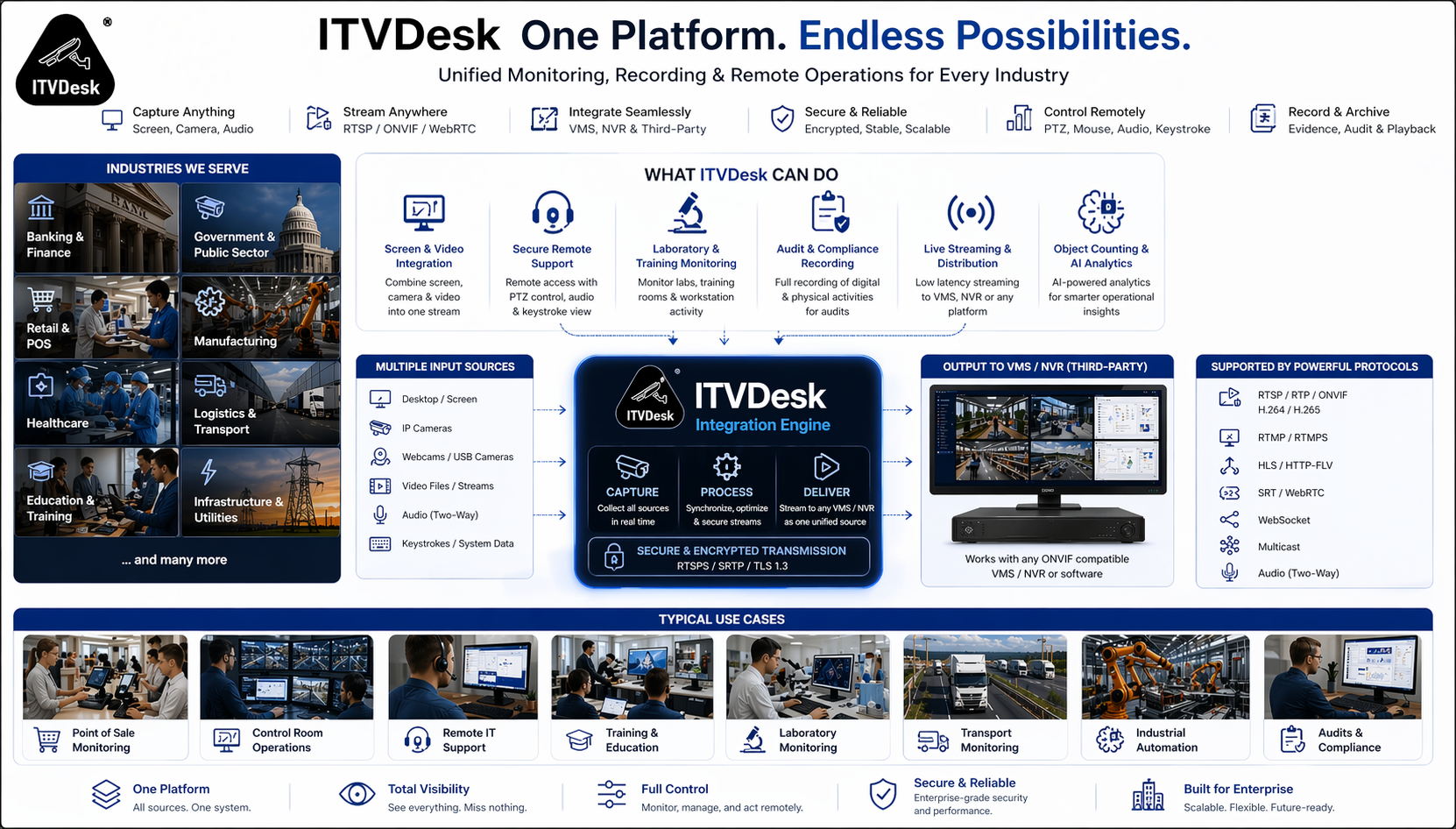
 Support for streaming video from Webcam, Live screen, Audio only, From file, Combined streams, External IP camera...
   - Support for streaming video streams H265, H264, MP4, MJPEG.
   - Support for streaming G711, G722, G726, AAC audio stream.
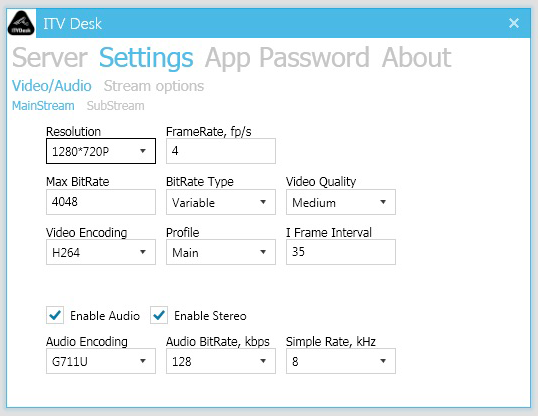
   - Support for configuring audio and video output parameters.
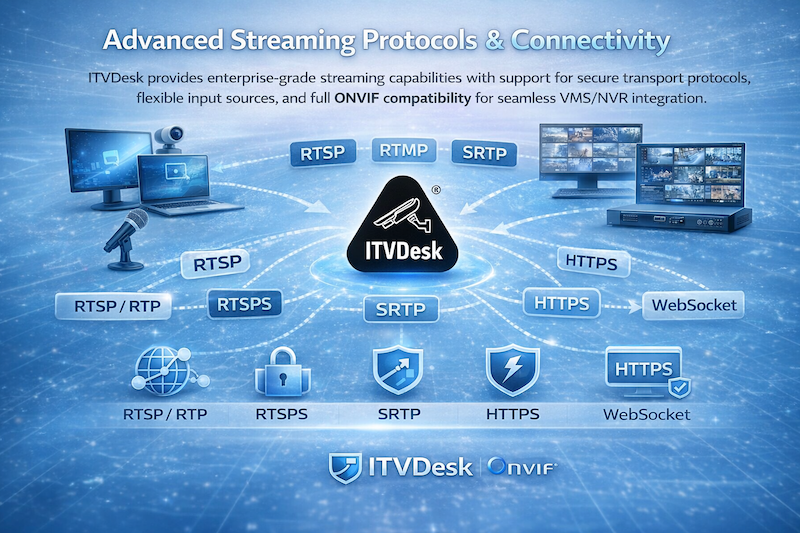
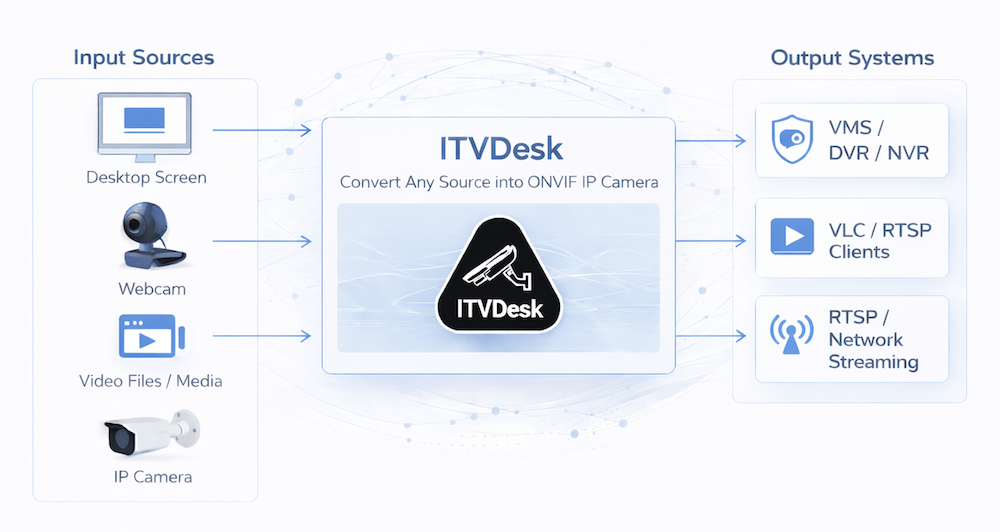
   - Support for connecting to External media source, include RTSP, RTMP and HTTP MJPEG stream and convert to ONVIF IP Camera Profile T.
Support RTP over UDP, TCP.
Support RTSP over HTTP/HTTPS function.
Support media external connection, include RTSP (tcp, utp, multicast), RTMP and HTTP MJPEG stream.
Support RTSP over Websocket function.
Support setup audio and video over meta data. (rtsp://yourip:port/ipc1-stream1/File1_media.mp4&t=unicast&ve=H265&p=udp&w=1280&h=1080&ae=G726)
Support ONVIF audio/videoplayback function.
Support audio back channel.
Support RTP multicast function.
Automatic transcoding.
Hardware acceleration decoding.

RTSP over HTTP and HTTPS

The key of RTSP over HTTP is to allow RTSP packets to communicate via HTTP port. Standard port of RTSP is 554, but due to various security policy configurations such as firewalls, there may be restrictions when the client accesses port 554, which prevents the normal transmission of RTSP packets. But the HTTP port (port 80) is generally open, so there is the idea of letting RTSP packets pass through port 80, namely RTSP over HTTP.


RTSP over Websocket

WebSocket protocol basically provides bidirectional communication between Client and Server for web application. This describes how a WebSocket connection can be established between a client and a server.

Example from ITVStreamer Geek Log print: WebSocket Handshake
This example shows the message transfer between an Web client (client) and an Web server (server). The client requests server to initiate a WebSocket connection using the WebSocket URI. The WebSocket Uri can be retrieved using the GetServiceCapabilities command of the ONVIF Media2 ServiceAn example WebSocketURI may look like, “ws:/ /192.168.88.1/webSocketServer

 
CLIENT-->SERVER:
GET /websocket HTTP/1.1
Host: 192.168.88.28
Upgrade: websocket
Connection: Upgrade
Sec-WebSocket-Key: KSO+hOFs1q5SkEnx8q5564nkE
Origin: http://192.168.88.28
Sec-WebSocket-Protocol: rtsp.onvif.org
Sec-WebSocket-Version: 13

SERVER-->CLIENT:
HTTP/1.1 101 Switching Protocols
Upgrade: websocket
Connection: Upgrade
Sec-WebSocket-Accept: KSO+hOFs1q5564nkEnx8bvp6w==
Sec-WebSocket-Protocol: rtsp.onvif.org
Sec-WebSocket-Version: 13

After the protocol upgrade is successful, perform standard RTSP protocol exchange, and send and receive data through websocket connection.

RTSP pusher

Applications using ITVDesk software as an RTSP server with the FFMpeg "pusher" option enables a wide range of applications, including:

  • Surveillance Cameras: Sending streams from IP cameras or other sources to the ITVDesk server for recording or further distribution.
  • Education and Webinars: Streaming educational materials or live webinars.
  • Live Events: Streaming concerts, sports events, and other live events.
  • Media Content Distribution: Distributing movies, TV shows, or other video content within an organization or over the internet.
  • Remote Monitoring: For industrial, agricultural, or environmental monitoring, where live video feeds are crucial for operations.
  • Healthcare: Streaming medical procedures or patient monitoring for remote consultation and diagnosis.
  • Video Blogging and Social Media: Creators can use it to live stream to their audience across different platforms.
  • Corporate Communications: For internal meetings, training sessions, or announcements, providing a secure and private channel for video distribution.
  • Customer Service and Support: Live product demonstrations or support sessions, enhancing customer engagement and experience.

By utilizing ITVDesk as an RTSP server and FFMpeg for sending streams, users can easily set up a flexible and powerful system for video content streaming across various applications.
More >>

Hadware acceleration decoding

Hardware acceleration is a method of speeding up computer processing by shifting work to a computer part that can do the job faster. Hardware acceleration for ITVDesk generally refers to using your GPU graphics card for better performance. See GPU decoding.

There are very few industries that rely on monitoring as much as banking. Due to a very high vulnerability to frauds, superior surveillance of all computers in the system is required.

ITVDesk helps increase level of transparency in banking system. It turns every computer into a virtual IP camera, streaming computer screen and webcam into your existing VMS or NVR video surveillance system. That way, you can observe activities captured by security camera with activities performed on computer screen simultaneously.

ITVDesk is also used for ATMs. It streams ATM screen and camera into video surveillance system, thus ensuring better protection for your customers. In case of any kind of damage, ITVDesk provides evidence showing both ATM screen and the person using it in real time.

Industries

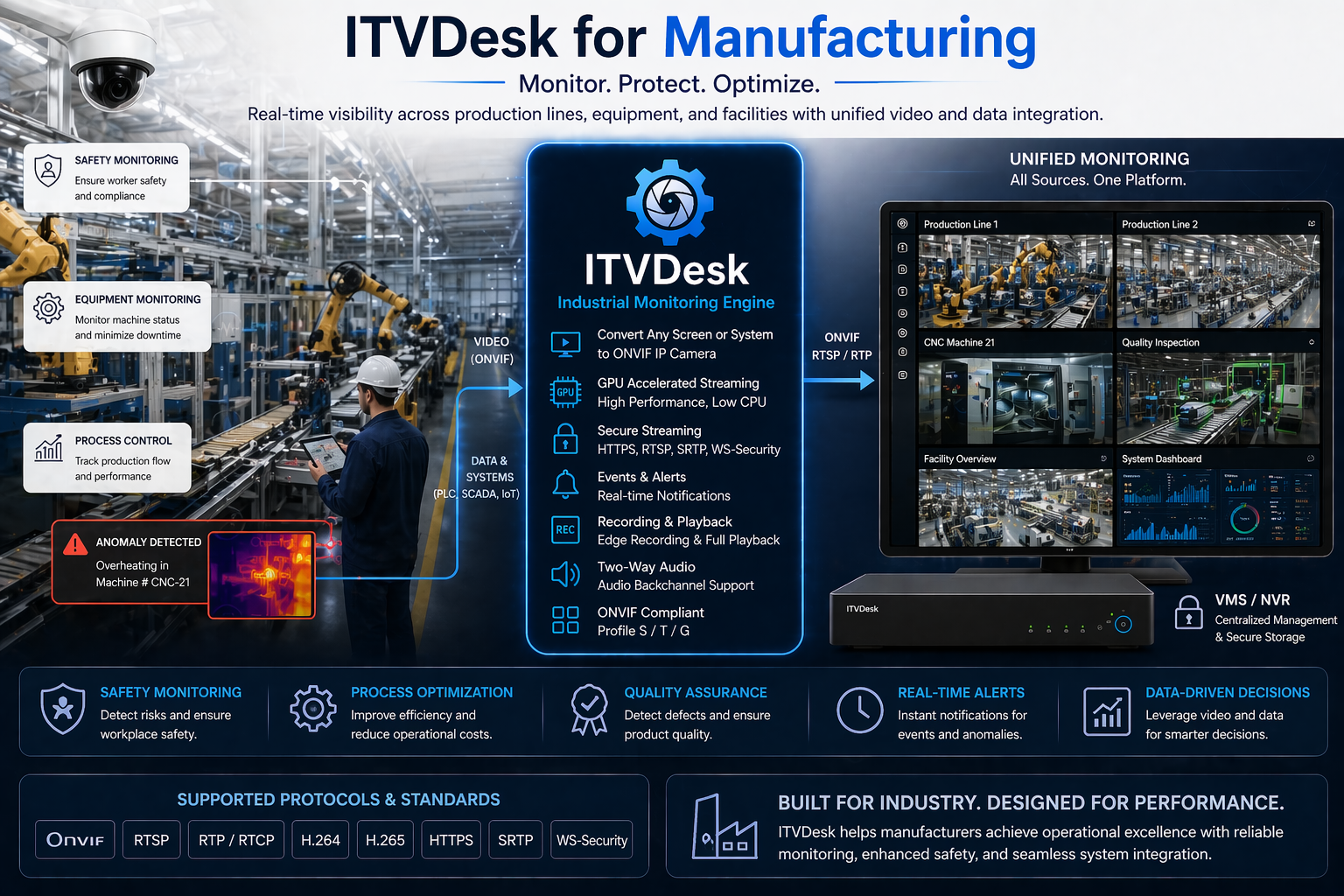
Monitoring and synchronizing processes is essential in manufacturing and production. Different parameters important for production flow are easily supervised when streamed to the same video system. Installing ITVDesk enables just that.

ITVDesk is compatible with all operating systems, which is not the case with all surveillance software on the market. Since most computers in production use Linux operating system, this multiplatform feature makes ITVDesk optimal solution for manufacturing and production.

Activities and content that children practice and cosume online are one of the main concerns of every parent. While there are many applications that provide partial control of your child’s digital activities, there are many aspects of computer usage that are potentially dangerous and require supervision of your child’s screen activities.

ITVDesk is an excellent solution for parental control. It streams your kid’s PC screen and webcam so you can monitor their activity without them knowing it. With ITVDesk you can rest assured that your kid is protected from any kind of dangerous activity. You can supervise their screen activity in real time and control how much screen time they have when you are not at home.

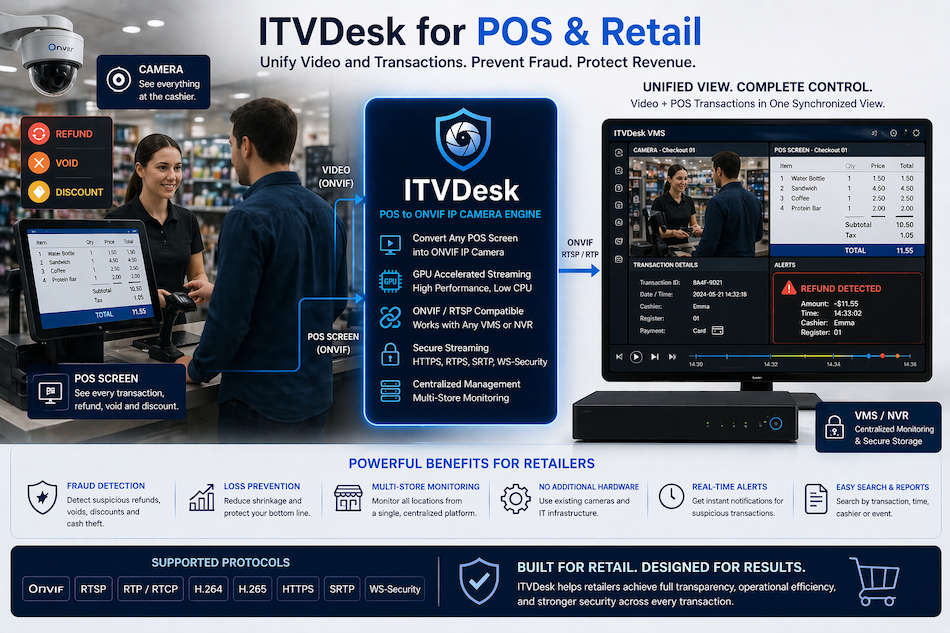
In today's fast-paced retail environment, the security and efficiency of operations are paramount. Retailers face the dual challenge of ensuring transaction accuracy and preventing fraud, all while providing a seamless customer experience. The integration of Point of Sale (POS) systems with video surveillance infrastructure emerges as a critical solution, offering unparalleled oversight and security for retail operations.

Seamless Integration and Enhanced Security

The advent of innovative software solutions has transformed traditional POS terminals into sophisticated surveillance devices. These solutions enable the seamless recording of POS terminal screens within the existing video surveillance environment, effectively treating the POS terminal as an ordinary security camera. This integration is designed for simplicity, requiring only a few clicks to install on Windows-based , Linux or Mac POS terminals. Once set up, the POS terminal screen is accessible for live viewing and recording through any ONVIF-compatible Video Management System (VMS) or Network Video Recorder (NVR) systems.

Universal Compatibility and Advanced Surveillance

What sets this solution apart is its universal compatibility and support for a wide range of platforms, including OSX, Windows, and Linux. This flexibility ensures that businesses of all sizes and types can enhance their security and operational efficiency without being constrained by their existing hardware or software systems. Moreover, the solution's support for ONVIF profiles S, T, and G enhances its surveillance capabilities, allowing for comprehensive monitoring and recording options.

Cost-Effective and Scalable Solutions

For retail operations ranging from small coffee shops to high-end restaurants, supermarkets, and pharmacies, the need for a reliable POS surveillance solution is universal. Traditional surveillance systems often come with high costs, requiring expensive hardware, additional wiring, and significant space. In contrast, this innovative software solution offers a cost-effective and scalable alternative. By leveraging existing CCTV infrastructure and turning POS terminals into virtual IP cameras, retailers can avoid the hefty expenses and complexities associated with traditional surveillance systems.

A New Dimension in Loss Prevention

Integrating POS screens as additional channels within your VMS brings together transactional data and video surveillance in a way that was previously unimaginable. Retailers can now conduct comprehensive searches across multiple POS systems, physical cameras, and store locations simultaneously. This capability opens up a new dimension in loss prevention investigations, providing retailers with the tools they need to combat fraud and theft effectively.

The Future of Retail Security

This transformative approach not only simplifies the technological landscape for retailers but also marks a significant advancement in retail security and operational oversight. By combining the functionalities of POS systems with the advanced surveillance capabilities of video monitoring, retailers gain a powerful tool in their efforts to enhance security, prevent fraud, and improve customer satisfaction.

In conclusion, the integration of POS systems with video surveillance represents a smart investment in the future of retail. It offers a scalable, cost-effective, and highly efficient solution that meets the evolving needs of the retail industry. With its ease of installation, universal compatibility, and advanced surveillance features, this solution stands out as a game-changer, enabling retailers to stay ahead of security challenges and competitive pressures in the digital era.