
ITVDesk – Virtual IP Camera for Computer Surveillance
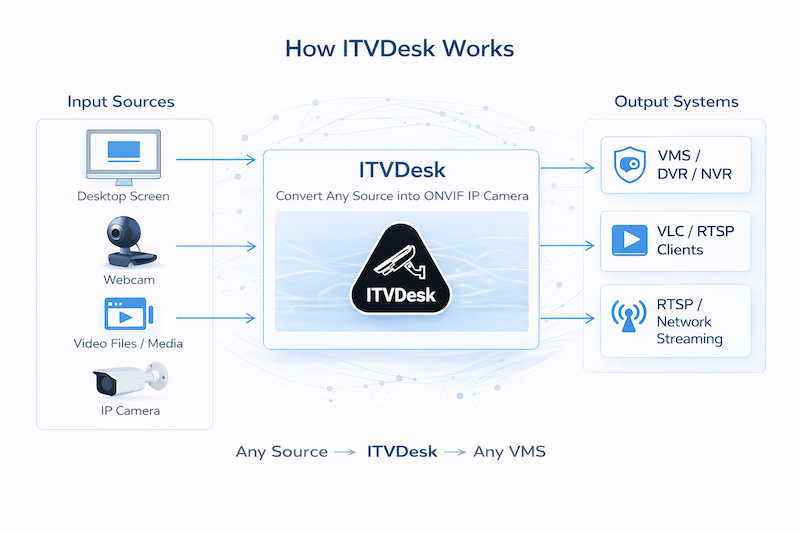
ITVDesk transforms any computer into a fully compliant ONVIF IP camera. It allows real-time streaming of desktop, webcams, audio, files, and external IP cameras directly into VMS and NVR systems.
Ideal for remote monitoring, IT security, workstation surveillance, and integration of non-standard video sources into professional video surveillance environments.
Overview
Core Features
- Camera protocol: ONVIF, Profile S, T, G, M ready *
- RTSP / RTP / SRTP / RTSPS streaming
- H.265 (HEVC), H.264, MJPEG video encoding
- Hardware & Software Processing (GPU-accelerated encoding/decoding with CPU fallback)
- Two-way audio (Audio Back Channel)
- PTZ desktop control (mouse + keyboard interaction)
- Motion detection (keyboard + mouse activity)
- Alarm IN / OUT integration
- Multi-stream support (Main, Sub, Custom)
- Auto discovery (WS-Discovery)
- Secure communication (HTTPS, SRTP, SHA-256)
Media Sources
- Desktop streaming (multi-monitor support)
- Windows application streaming (capture and stream specific application windows)
- Webcam streaming (multiple devices, HDMI, iPhone camera...)
- Audio-only streaming (system sound and microphone)
- Video file streaming (*.mp4, *.flv and other formats)
- Combined streams (merge multiple sources into a single output channel)
- External IP cameras (RTSP, RTMP, HTTP MJPEG)
- External ONVIF devices (convert to virtual ONVIF camera)
- RTSP pusher streams (FFmpeg and external encoder integration)
- Audio-video mixing (combine any audio with any video source)
Total supported sources: up to 256 (16 devices × 16 channels)
Windows Server, RDP and RDS Session Monitoring
ITVDesk supports Windows Server, Remote Desktop (RDP), and Remote Desktop Services (RDS) environments, allowing selected Windows desktops to be monitored and streamed directly to VMS and NVR systems.
- Monitor the active Windows session, local console, or desktop of a selected Windows user.
- Create separate camera channels for different users and monitors.
- Keep each channel connected to the intended user after login, logout, or reconnection.
- Use Full Desktop or Selected Area capture independently for each channel.
- Keep the video channel available while a user is offline and automatically restore the live desktop when the user returns.
- Use Server Mode to keep ITVDesk available during Windows user and remote-session changes.
Suitable for Windows Server monitoring, remote support, control rooms, hosted desktops, and multi-user RDP/RDS deployments. Server Mode is available with a full ITVDesk license.
Multi-Channel and Multi-Camera Architecture
Multi-channel mode:
One ONVIF device with multiple video channels. Example: 2 monitors + 3 webcams = 5 channels in one device.
Multi-camera mode:
Each source becomes a separate ONVIF camera (different ports). Example: 3 sources = 3 IP cameras (ports 7000, 7001, 7002).
Video and Audio Processing
- Hardware accelerated encoding (GPU support)
- Automatic transcoding, transmuxing, transrating
- Video filters (blur, sharp, grayscale, deinterlace)
- Flexible resolution and bitrate control
- Audio formats: G.711, AAC, G.726, OPUS, G.722
- Video rotation (Auto, Flip, 90°, 180°)
OSD (On Screen Display)
- Keystroke overlay (keyboard capture in video)
- Time and date display
- Channel name display
- Custom text overlay
- Flexible positioning (corners)
Motion Detection and Alarm System
- Mouse movement detection
- Keyboard activity detection
- Configurable detection duration
- Alarm IN (panic button)
- Alarm OUT actions:
- Run application
- Shutdown / reboot
- Lock system
RTSP Streaming Configuration
Example RTSP stream:
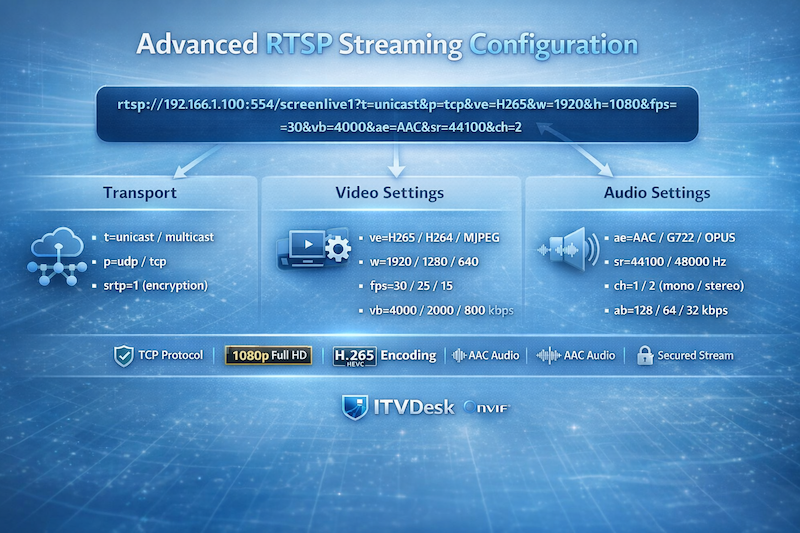
Example with parameters:
Example: 1080p H.265 stream, 30 FPS, 4000 kbps, AAC audio, secure transmission over TCP.
Multiple streams:
ipc1-stream2 → SubStream
ipc1-stream3 → ThirdStream
Multiple sources:
screenlive1 → Monitor 2
videodevice0 → Webcam
Advanced RTSP Parameters
&p=udp / tcp
&ve=H265 / H264 / MJPEG / MP4
&w=width
&h=height
&fps=frames per second
&vb=video bitrate (kbps)
&ae=audio codec
&sr=sample rate
&ch=audio channels
&ab=audio bitrate (kbps)
&srtp=0 / 1 (enable encryption)
Configure video, audio, transport, and security parameters directly through the RTSP URL to dynamically control stream quality and performance without restarting the server.
Device Management
- Manage streams directly from VMS/NVR
- Change IP, DNS, Gateway
- User management (Admin / Operator / User)
- Relay control (Alarm OUT)
- Video profiles (Main, Sub, Custom)
- Bitrate, FPS, GOP, session control
Supported Services
- Device Discovery (WS-Discovery)
- Device Management
- Media Service (v1 + v2)
- PTZ Service
- Event Service
- Imaging Service
- Analytics Service
- Recording Control (Profile G)
- Recording Search
- Replay Service
- Device IO
Security
- HTTPS / RTSPS
- SRTP encryption
- WS-UsernameToken authentication
- SHA-256 / MD5 digest
- AES data protection
Additional Features
- PTZ Desktop Control (control mouse and interact with desktop via VMS)
- Keystroke Overlay (display keyboard input directly on video stream)
- Hidden background mode
- Auto start with system
- Password protection
- Prevent sleep mode
- Offline installation support
- Advanced streaming diagnostics
Compatibility
- Hikvision
- Dahua
- Milestone XProtect
- Network Optix (Nx Witness)
- Any ONVIF-compatible system
Turn Any Computer into a Virtual ONVIF IP Camera
Stream desktop screens, applications, webcams, and audio directly into VMS/NVR systems using ONVIF and RTSP protocols.
Software-only solution. No hardware required. Fast deployment with a free trial available.